
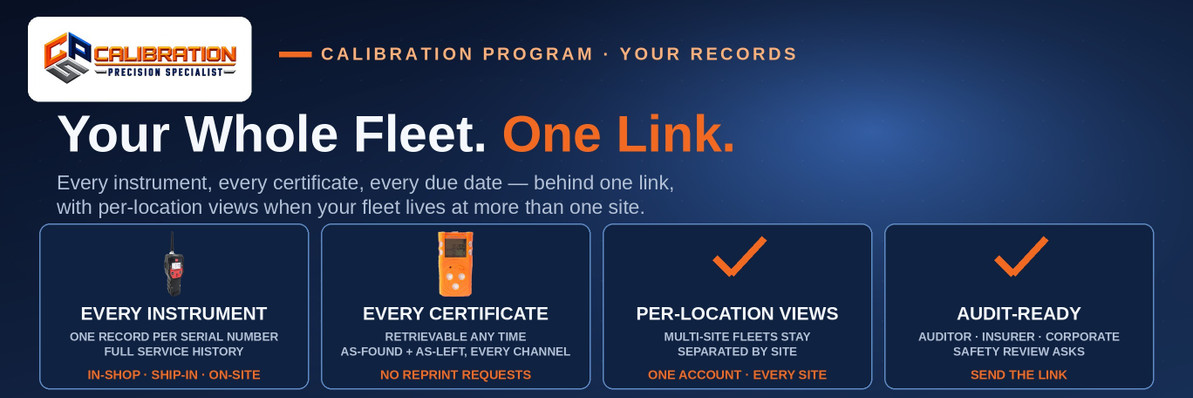
Your Whole Fleet's Calibration History Behind One Link
Every CPS calibration customer has one link that opens their whole fleet's calibration history: every instrument, every certificate, and every due date, with per-location views for multi-site fleets — so when an auditor, an insurer, or a corporate safety manager asks for proof of calibration, you send the link instead of digging through binders, email threads, and filing cabinets.
The request always sounds simple: "Send me your calibration records." The response never is. Certificates are scattered across whoever received them — one in the safety office, two in a supervisor's email, the on-site report in a folder from the visit. Somebody spends an afternoon assembling a fleet's worth of proof from four places, and the assembly is only as complete as their filing was.
There is a simpler architecture: keep every record in one place from the moment the work is done, and give the customer one link to all of it. That is how the CPS Calibration Program works, and this post shows what is behind the link.
What Does the Fleet History Link Show?
Everything the record holds, organized the way you actually get asked for it:
| Behind the link | What it answers |
|---|---|
| Every instrument on your account | "What detectors do you have, and where are they?" — make, model, and serial number |
| Every calibration event | "Has this unit been kept in calibration?" — the full history, in order |
| The certificate for every job | "Show me the proof" — the actual certificate, not a summary |
| As-found / as-left data | "Was it reading right?" — every channel, before and after adjustment |
| The gas used, with its CoA | "What was it calibrated against?" — the cylinder's Certificate of Analysis, linked from the certificate |
| Current due dates | "When is it due next?" — and the reminder system watches them for you |
| Per-location views | "Show me just the units at this site" — multi-site fleets sliced by location |
The important property isn't any single row — it's that the rows are never assembled by hand. The history behind the link is the record itself, written at the bench when the work happened. There is no separate reporting step where a certificate can get missed, misfiled, or saved to the wrong folder.
Who Asks for Calibration History?
The link earns its keep in four recurring moments:
- The compliance audit. An auditor samples instruments and asks for their calibration proof. Instead of a records request that takes days, the sampled serial numbers are answered from the link in the room.
- The insurance review. Insurers pricing or renewing coverage for industrial operations ask how safety-critical instruments are maintained. A complete, continuous history is a stronger answer than a stack of certificates of varying ages and formats.
- The corporate safety review. Multi-site companies get asked by their own corporate EHS teams to prove that every location's fleet is in calibration. Per-location views let each site's slice be pulled without sorting the whole fleet by hand.
- The incident investigation. After an exposure or a near-miss, the first document requested is the instrument's calibration history. Having it behind one link — with as-found readings showing how the unit was performing before its last adjustment — turns a document hunt into a one-minute errand.
How Do the Per-Location Views Work?
A fleet that lives at one plant is one list. A fleet spread across several sites, substations, or stations is several lists wearing one account — and most record systems force you to keep them sorted yourself.
In your CPS record, instruments carry their location, and the history can be viewed per location: open the fleet, pick the site, see that site's instruments, certificates, and due dates. The records are one system underneath — an instrument's history doesn't split when it moves or when its calibration happens through a different door — but the view respects how your company is actually organized. When corporate asks about one plant, you send one plant's view, not a 200-line export and an apology.
How Does History Get Behind the Link?
By being created there in the first place. Every CPS calibration — in-shop at our Rockwood, TN bench, shipped in by mail, or performed on-site at your facility — is written to the instrument's record as part of the job, and the certificate is generated from that record. The link simply opens what's already whole.
Two honest boundaries:
- The history starts with your first CPS calibration. Work another provider did before an instrument came to us lives in that provider's paperwork. From the first CPS job onward, the record is complete and never has a gap.
- The link is yours to share. You decide who gets it — send it to your auditor, your insurer, or your corporate office as you see fit. It's your fleet's history; we just keep it in one place.
And like everything else in the program, the link carries no fee: no contract, no monthly charge, no per-seat license. It comes with the calibration work — $55 single-gas and $90 for 4- and 5-gas instruments in-house — because a record you can't reach isn't much of a record. What each certificate in that history contains is covered field by field in our certificate post.
Frequently Asked Questions
What is a fleet calibration history link?
A fleet calibration history link is a single web link that opens one customer's complete calibration history at CPS: every instrument on the account, every calibration event, every certificate, and every due date, with per-location views for multi-site fleets. Instead of storing certificates in binders and email, the customer sends the link whenever an auditor, insurer, or safety reviewer asks for calibration proof.
What can I see in my fleet's calibration history?
Every instrument CPS has calibrated for you — manufacturer, model, and serial number — with its complete service history in order, the certificate from every job, as-found and as-left readings on every channel, the calibration gas used with its Certificate of Analysis link, and the next due date. The view can be filtered per location for fleets spread across multiple sites.
Can I view calibration history by location?
Yes. Instruments in your CPS record carry their location, and the fleet history can be viewed per location, so a multi-site customer can pull one plant's or station's instruments, certificates, and due dates without sorting the entire fleet. The underlying record stays unified — an instrument's history doesn't split — but the view follows your site's organization.
Who would I share my calibration history link with?
Whoever asks for calibration proof: a compliance auditor sampling your instruments, an insurer reviewing how safety equipment is maintained, a corporate EHS or safety team checking a site, or an investigator after an incident. The link is yours — you choose when to send it and to whom. It replaces assembling certificates from binders, email threads, and shared drives.
Does the fleet history include the actual certificates?
Yes. Every calibration's certificate is part of the record and retrievable from the history — the same certificate issued at the time of the job, with as-found and as-left readings on every channel, the calibration gas and its clickable Certificate of Analysis link, measurement uncertainty, the due date, and the technician. You never need to request a reprint or wait for one to be emailed.
How far back does the calibration history go?
Back to each instrument's first calibration at CPS. Records from other providers before that aren't in the system — they live in that provider's paperwork — but from the first CPS job onward the history is complete and continuous, including work done in-shop, shipped in, and performed on-site, all on the same per-instrument record.
Does ship-in calibration appear in the same fleet history?
Yes. Ship-in (mail-in), in-shop, and on-site calibrations all write to the same per-instrument record, so the fleet history behind your link is complete regardless of how each instrument reached the bench. An instrument shipped in one year and serviced on-site the next shows one continuous history with no seam.
Is there a fee for the fleet calibration history link?
No. The history link is part of the CPS Calibration Program and comes with the calibration work — no contract, no monthly fee, no per-user or per-record charge. You pay for calibrations themselves: $55 for a single-gas instrument and $90 for a 4- or 5-gas instrument at in-house rates, with on-site work quoted in writing.
What if some of my detectors were calibrated by another provider before?
Those calibrations stay in the other provider's records — your CPS history can't retroactively hold work we didn't do. Once an instrument comes to CPS, its record starts and every subsequent CPS calibration is added to it. Many customers route all calibration through CPS from that point specifically so the history behind the link is the whole story from then on.
How do I get my fleet calibration history link?
Have an instrument calibrated by CPS. The first job opens your account's record and your instruments' histories, and the link is how you reach them from then on. Call CPS Calibrations at 865-900-8844, or bring or ship instruments to 109 S. Front Street, Rockwood, TN 37854 — the calibration services page covers the service itself.
The Bottom Line
Calibration proof shouldn't be an archaeology project. At CPS, every instrument's history — every event, every certificate, every due date — lives behind one customer link with per-location views, so the next time someone asks for your records, the answer takes seconds.
Start the record with one calibration: call CPS Calibrations at 865-900-8844. From the first job on, your fleet's history is one link — and the due-date reminders make sure it never goes stale.
CPS Calibrations · 109 S. Front Street, Rockwood, TN 37854 · Calibration Services · The CPS Calibration Program
Ready to mail yours in?
Start the ship-in request, pack the meter, and we handle the rest — every channel calibrated as configured, full certificate returned with it.
Start Your Ship-In Requestor call 865-900-8844
Recent Posts
-
Can You Add a Pump to a SENKO SGT-P or MGT?
Yes — SENKO's SP-Pump101 external sampling pump ($330, part AAA006000) fits the SGT, SGT-P, and MGT, …Nov 12th 2026 -
What Refrigerant Detection Does a Grocery Store Need?
A grocery store needs refrigerant detection in three places: low-mounted carbon dioxide (R-744) sens …Nov 11th 2026 -

What Is LEL and UEL? The Explosive Range, Gas by Gas
The LEL is the lowest concentration of a gas in air that can explode, and the UEL is the highest: me …Nov 10th 2026