
Why Does Gas Detector Data Logging Matter? The Paper Trail Your Incidents Need
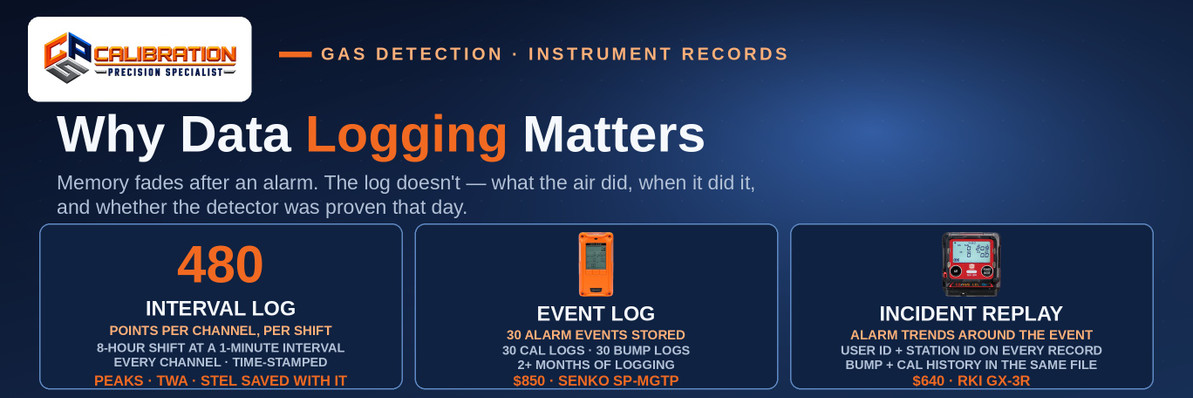
Gas detector data logging matters because it is the only objective record of an incident: a data-logging detector time-stamps the readings on every channel at a set interval and separately records alarm events, peak readings, TWA and STEL exposure values, and the bump-test and calibration history that proves the instrument was working that day. The SENKO SP-MGTP ($850), for example, stores 30 alarm events, 30 calibration logs, and 30 bump-test logs alongside more than 2 months of measurement data logging, while the RKI GX-3R ($640) adds user ID and station ID to every record — so after an alarm, you can reconstruct what the air did, when it did it, who was carrying the detector, and whether it had passed its bump test that morning, instead of relying on what anyone remembers.
Ask five people what happened during a gas alarm and you will get five timelines. Someone says the alarm lasted seconds; someone else says minutes. Nobody is lying — stress compresses memory, and an evacuation scrambles sequence. The detector is the one witness that was watching the whole time, measuring on a clock, with no stake in the outcome. Data logging is how you interview that witness. This post explains what a log actually records, which questions only a log can answer, how long the surrounding records have to live, and — honestly — where a log's evidence runs out.
What Does a Gas Detector Data Log Actually Record?
"Data logging" is really four different records sharing one memory, and confusing them is where most logging programs go wrong:
| Record | What it captures | What it answers |
|---|---|---|
| Interval (session) log | Every channel's reading at a set interval while the instrument is on — at a 1-minute interval, an 8-hour shift is 480 time-stamped points per channel | "What did the air do over the whole shift, not just during the alarm?" |
| Alarm event log + alarm trend | Each alarm as an event, with the readings around it (RKI logs alarm trends — the climb into and fall out of the alarm condition) | "How high did it get, how fast did it rise, and when did it clear?" |
| Peak, TWA, and STEL values | The highest reading of the session (lowest for oxygen), the 8-hour time-weighted average, and the 15-minute short-term exposure average | "How bad was the worst moment, and what was the actual exposure dose?" |
| Bump-test and calibration history | Date, result, and details of each functional bump test and full calibration | "Was this instrument proven to work before it was trusted?" |
On top of the readings, better instruments stamp each record with who and where: the RKI GX-3R logs a user ID and a station ID alongside its calibration and bump-test history, alarm events, and alarm trends, and the record downloads to a PC (a USB-to-IrDA cable, or automatically through the SDM-3R calibration station). The SENKO SP-MGTP keeps its storage counts explicit — 30 alarm events, 30 calibration logs, 30 bump-test logs, and 2+ months of data logging — which tells you exactly how deep its memory runs before you buy it. The RKI GX-6100 adds snap logging — a manually captured reading on demand — for spot checks you want on the record. All of it sits alongside the exposure math in our TWA and STEL alarms explainer: the log is where those averages come from.
The Incident Questions Only a Log Can Answer
When something goes wrong — an overexposure, a hospitalization, a near miss, a damaged process — the investigation asks the same questions every time. A downloaded log answers most of them with timestamps instead of testimony:
- Was there really gas, and how much? The interval log and peak value replace "it smelled strong" with a number and a unit. A peak of 85 ppm H₂S and a peak of 12 ppm H₂S are different incidents with different causes and different fixes.
- How long did it last? Duration separates a transient whiff past a sensor from a sustained release. The alarm trend shows the rise and the decay — a sharp spike that clears in a minute points at a passing source; a plateau points at a continuing one.
- Which came first — the alarm or the symptom? If a worker reported feeling dizzy at 10:20 and the log shows the CO channel crossing its alarm at 10:18, the instrument did its job and the response is the story. If the log shows no alarm at all, the investigation turns to the instrument, the placement, or a hazard the detector doesn't measure.
- Who was exposed, and to how much? With user IDs assigned, the session log ties readings to a person, and the TWA/STEL values turn "he was in there a while" into a defensible exposure estimate.
- Was the instrument itself trustworthy that day? This is the question that decides whether every other answer counts. The bump and calibration history in the same download shows whether the detector had been functionally tested before use — the check the ISEA position statement in OSHA's calibration guidance calls for before each day's use, and the step our bump-test guide walks through. An accurate-looking log from an instrument that failed its last bump test is evidence against you, not for you — which is the whole argument in what happens if you don't calibrate a gas detector.
That last point is why the log and the calibration program are one system, not two. CPS calibrates every channel on the instruments it services, and the record of that work belongs in the same file as the instrument's own logs.
How Long Does the Paper Trail Have to Live?
Different pieces of the trail carry different retention rules, and mixing them up is common:
- Confined-space entry permits: OSHA's permit standard (29 CFR 1910.146) requires the employer to retain each canceled entry permit for at least 1 year, specifically so the entry program can be reviewed. The detector log from that entry is the natural companion document to the permit it supported.
- Employee exposure records: Where logged readings document an employee's exposure to a toxic substance, OSHA's access-to-records standard (29 CFR 1910.1020) treats them as employee exposure records, which must be kept for at least the duration of employment plus 30 years. That is not a typo — exposure evidence is expected to outlive the job, because some occupational illnesses surface decades later.
- Calibration and bump-test records: No single OSHA paragraph sets one retention period for these, but OSHA's calibration guidance recommends keeping calibration records for the life of the instrument — the practice that lets you spot the one detector in the fleet that has needed constant adjustment, and prove a pattern of care if the instrument is ever questioned.
Read those three together and the practical rule writes itself: download the logs, file them by instrument serial number next to the permits and calibration records, and keep them far longer than feels necessary. Storage is cheap. Reconstruction is impossible.
The Honest Limits: What a Log Cannot Do
A data log is powerful evidence, which is exactly why its limits deserve plain statement:
- Memory is finite, and old data overwrites. Storage counts are real numbers — when the SP-MGTP's 30th alarm-event slot fills, the next event pushes out the oldest. A log you never download is a log with an expiration date. Download after any significant alarm event, and on a routine schedule the rest of the time.
- A wrong clock makes a wrong timeline. If the instrument's date and time were never set — or drifted after a battery change — the log's timestamps won't line up with permits, camera footage, or witness statements. Set the clock when the instrument is commissioned and check it at calibration.
- A log proves what the instrument read, not what the air was. If a sensor was drifted, poisoned, or past its life, the log faithfully records wrong numbers. Logging never substitutes for bump testing and calibration; it documents whether they happened. (And a detector carried in a truck box instead of on the worker logs the truck box's air, perfectly.)
- No user ID, no "who." Instruments can log user and station IDs only if someone sets them up. A shared grab-and-go fleet with no IDs assigned produces readings tied to a serial number, not a person — still useful, but weaker evidence.
- Not every detector logs. Basic and disposable single-gas units may keep little more than an event counter or nothing at all. If the record matters — and after an incident it always does — logging capacity is a purchase specification, not a bonus feature.
How Do You Build a Logging Habit That Survives Contact With the Real World?
The programs that actually have a log when they need one share four habits:
- Set the instrument up once, properly. Correct clock, a sensible interval (1 minute is a workable default for exposure work — fine enough to reconstruct an event, coarse enough to stretch memory across weeks), user and station IDs loaded, alarms latching as your program requires.
- Download on a trigger, not a whim. After any alarm event, any over-range, and any incident — before the instrument goes back out. Routine downloads (weekly for a working fleet) catch the rest before overwrite.
- Automate what you can. Docking and calibration stations such as RKI's SDM-3R pull the log as part of the bump/calibration routine, so the download happens because the process happened, not because someone remembered. Our portable multi-gas monitors category is where the logging-capable instruments live — compare the storage counts in the specifications before you buy, not after.
- File by serial number, with the rest of the trail. Log download, calibration certificate, permit, and incident report in one place per instrument. An investigator — internal or OSHA — should be able to pull one detector's whole story in one pull.
Frequently Asked Questions
What is data logging on a gas detector? Data logging is a gas detector's built-in recording of its own measurements and events: time-stamped readings for every gas channel at a set interval, plus alarm events, peak readings, TWA and STEL exposure values, and a history of bump tests and calibrations. The records download to a computer (by infrared/USB link, Bluetooth, or a calibration station, depending on the model) so an incident, an exposure, or the instrument's own maintenance can be reconstructed after the fact instead of reconstructed from memory.
What does a gas detector data log record? Four things: interval readings (every channel, time-stamped, for as long as the instrument is on), alarm events with the readings around them, exposure summaries (peak, 8-hour TWA, and 15-minute STEL values), and the instrument's bump-test and calibration history. Many instruments also record a user ID and station ID — the RKI GX-3R does — so each record shows who carried the detector and where it was assigned.
How long does a gas detector store its data logs? It depends on the model and the logging interval, and the limits are stated as counts and months, not forever. The SENKO SP-MGTP stores 30 alarm events, 30 calibration logs, and 30 bump-test logs plus more than 2 months of measurement data logging. Shorter logging intervals fill memory faster — at a 1-minute interval one 8-hour shift is 480 points per channel. When memory fills, the oldest records are overwritten, so logs must be downloaded before they age out.
Do you have to keep gas detector calibration records? Keep them for the life of the instrument — that is the practice OSHA's calibration guidance recommends, and it is what lets you prove an instrument was maintained to the manufacturer's instructions. Related records carry hard OSHA retention rules: canceled confined-space entry permits must be kept at least 1 year under 29 CFR 1910.146, and records that document employee exposure must be kept for at least the duration of employment plus 30 years under 29 CFR 1910.1020.
Can gas detector data logs be used in an incident investigation? Yes — that is their main purpose. A downloaded log gives an investigation time-stamped readings, the peak concentration, how long an alarm condition lasted, the exposed worker's TWA and STEL values, and proof of whether the instrument had passed its bump test and calibration. Investigators, insurers, and OSHA compliance officers all treat a contemporaneous instrument record as stronger evidence than after-the-fact recollection, in whichever direction the numbers point.
What is the difference between an event log and an interval log on a gas detector? An interval log is the continuous record: every channel's reading, stored at a set interval (for example, once a minute) for the whole time the instrument is on. An event log is the highlight record: discrete happenings such as alarms, bump tests, and calibrations, stored as individual entries — often with an alarm trend of readings from just before and after the event. Investigations use the event log to find the moment and the interval log to reconstruct everything around it.
How do you download data from a gas detector? It depends on the model: many RKI instruments download through a USB-to-infrared (IrDA) cable or automatically when the instrument is placed in its calibration station (the SDM-3R handles the GX-3R), some models transfer by Bluetooth to a phone app, and SENKO instruments connect to PC software. The download produces a file or report keyed to the instrument's serial number — file it with that instrument's calibration records and any related entry permit.
Does data logging replace bump testing or calibration? No. Data logging records what the instrument read; bump testing and calibration are what make those readings worth recording. A drifted or poisoned sensor produces a neat, time-stamped log of wrong numbers. The log's own bump and calibration history is part of the evidence: it shows whether the instrument was functionally tested before each day's use, as ISEA recommends in OSHA's calibration guidance, and calibrated on the manufacturer's schedule.
How often should you download gas detector data logs? Download after any alarm event, over-range condition, or incident — before the instrument returns to service — and on a routine schedule (weekly is workable for an active fleet) so records are captured before the finite memory overwrites the oldest ones. If your instruments run through a docking or calibration station, set the download to happen as part of that routine so it does not depend on anyone remembering.
Which gas detectors have data logging? Most professional multi-gas monitors do, in varying depth. At CPS, the RKI GX-3R ($640) logs user ID, station ID, calibration and bump-test history, alarm events, and alarm trends; the SENKO SP-MGTP ($850) stores 30 alarm events, 30 calibration logs, and 30 bump-test logs with 2+ months of measurement logging; and the RKI GX-6100 adds snap logging for on-demand readings. Basic and disposable single-gas units may log far less or nothing — check the storage specification before you buy if the record matters.
The Bottom Line
An alarm lasts minutes; the questions about it last months. Data logging is what lets you answer those questions with a timestamped record — what the air did, how high it peaked, how long it lasted, who was carrying the detector, and whether that detector had been bump-tested and calibrated like it was supposed to be. The feature only pays off if the record survives: set the clock and the user IDs, download after every event that matters and on a schedule the rest of the time, and file the log with the permit and the calibration certificate. Memory fades. A downloaded log doesn't.
Want help picking a monitor whose logging matches your record-keeping — or getting a fleet's downloads and calibrations on one routine? Call 865-900-8844 or reach us through Contact Us. Browse portable multi-gas monitors, the SENKO SP-MGTP, or our calibration services to keep the instruments behind the logs proven.
CPS Calibrations · 109 S. Front Street, Rockwood, TN 37854 · Calibration Gas · Calibration Services · Contact Us
Recent Posts
-

Why Does Gas Detector Data Logging Matter? The Paper Trail Your Incidents Need
Gas detector data logging matters because it is the only objective record of an incident: a data-log …Oct 22nd 2026 -

What Is a Confined Space? OSHA's Definition, the 3 Tests, and When It Becomes Permit-Required
A confined space is a space that passes all three of OSHA's tests at the same time: it is large enou …Oct 21st 2026 -
PID vs. LEL for VOC Detection: Which Sensor Do You Actually Need?
Use a PID to detect VOCs and an LEL sensor to detect explosive atmospheres — they measure different …Oct 21st 2026