
Crowcon Connect Explained: What the IQ Platform Does With Your Gas Detection Data
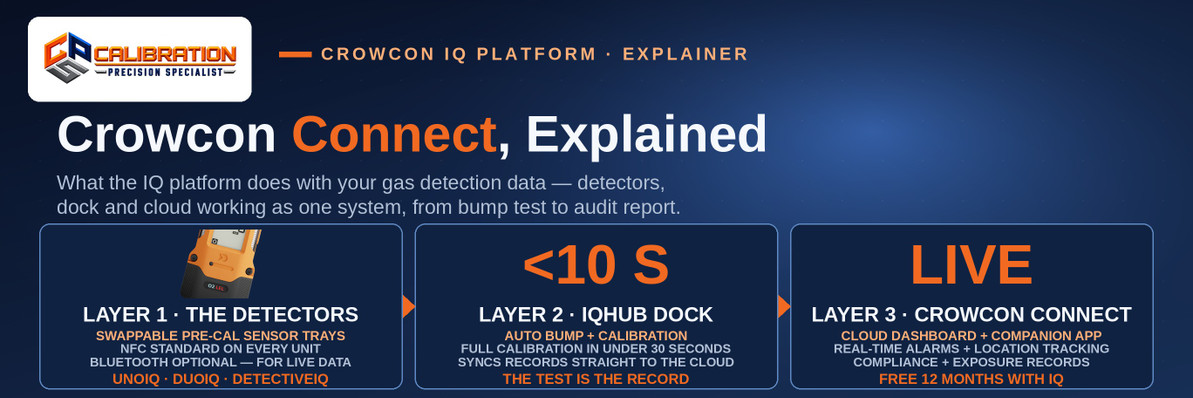
Crowcon Connect is the cloud platform behind Crowcon's IQ range of gas detectors: it collects the alarm events, exposure records, bump-test results, and calibration records generated by IQ instruments — the single-gas UnoIQ, the two-gas DuoIQ, and the DetectiveIQ area monitor — and presents them in one dashboard with compliance status, customisable reports, and traceability for audits. The system works in three layers: the detectors themselves, which carry sensors in swappable pre-calibrated trays; the IQhub docking station, which runs an automatic bump test in under 10 seconds and a full calibration in under 30 seconds and syncs the results; and the cloud, where the records live. Crowcon includes Connect free for the first 12 months with any IQ purchase.
Every gas detector in your fleet is already generating the records your safety program runs on: who bump-tested what this morning, which unit is overdue for calibration, what the peak reading was during last Tuesday's alarm, whose exposure total is climbing. The problem was never that the data doesn't exist — it's that on a conventional fleet it lives in the worst possible places: a paper logbook in the tool crib, a spreadsheet one person maintains, or the detector's own memory, where it stays until somebody cables the unit to a PC and downloads it. When we wrote about why gas detector data logging matters, the point was that the log is the paper trail your incidents need. The IQ platform is Crowcon's answer to the next question: what if the paper trail kept itself? This explainer walks through what Connect is, how the three layers fit together, what the data actually does for a safety manager, and — just as important — which Crowcon instruments are on this platform and which are not.
What Is Crowcon Connect?
Crowcon Connect is Crowcon's cloud-hosted fleet platform for gas detection. In Crowcon's own summary on its IQ range page: "Crowcon Connect brings alarm events, user exposures and compliance records into a single dashboard. With customisable reports, instant traceability and secure cloud storage, you are always audit-ready and always in control."
Three things in that sentence are worth unpacking. Alarm events and user exposures — the platform isn't just a calibration tracker; it holds what happened in the field, including who was exposed to what. Compliance records — bump tests and calibrations, the two records every audit asks for first. And secure cloud storage — the records live in Crowcon's cloud, not on one laptop in the safety office, so they survive staff changes, lost notebooks, and the detector being sent out for repair.
Connect is the top layer of what Crowcon calls the IQ ecosystem. Understanding it means understanding the two layers underneath it, because Connect itself touches no gas and turns no wrench — it is where the evidence ends up.
Layer 1: The Instruments — Detectors Built to Hand Over Their Data
The IQ range launched in September 2025 with three instruments, and they share an architecture designed around data and serviceability rather than around a sealed box:
- UnoIQ — the single-gas member: one gas at a time, and Crowcon's claim that it is the only single-gas detector that can be upgraded to two gases mid-life, on the same hardware.
- DuoIQ — the two-gas member: 11 US pairings across six gases, built for hazard assessments that name exactly two gases.
- DetectiveIQ — the area monitor: up to 7 gases, deployed at the edge of the work rather than on a worker.
What makes them one platform rather than three products:
- Swappable, pre-calibrated sensor trays. On the IQ portables, the sensors don't live in the instrument — they live in trays that swap in the field, with intelligent recognition of what's installed. A failed or expired sensor becomes a two-minute tray swap instead of a repair shipment, and on the UnoIQ the tray path is also the route to the mid-life second gas.
- Down-facing sensors, Crowcon's design answer to dust, water, and debris collecting on upward-facing sensor inlets and causing false alarms.
- Onboard logging. The IQ portables store up to 500 event logs — alarms, bump results, calibration history — until the record is docked, downloaded, or pushed to Connect.
- NFC as standard. Every IQ portable carries NFC for tap-to-pair identity, worker assignment, and setup with the Companion App.
- Bluetooth as an option. This is the distinction that matters for Connect, so be precise about it: Bluetooth is an optional configuration on the IQ portables, and it is the piece required for live data — streaming readings and alarms to the Companion App and onward into Connect in real time. A non-Bluetooth unit still docks, still logs, and still reports through the hub; it just doesn't stream live.
The DetectiveIQ adds the platform's networking trick: its built-in Bluetooth Mesh alarm passing links up to 25 units per group — 250 devices across a site — so an alarm on one unit alerts the whole group, and the group reports into Connect. One platform, three form factors, one data model underneath.
Layer 2: IQhub — The Dock That Does the Paperwork
IQhub is the docking station Crowcon calls "the control centre of the IQ ecosystem," and its job description has three parts:
- Test and calibrate, fast. Drop an IQ instrument in and the hub runs an automatic bump test in under 10 seconds and a full calibration in under 30 seconds. Crowcon bills these as the fastest bump test and calibration in the industry. The hub uses what Crowcon describes as the world's first tubeless manifold system, which works with every gas — including the "sticky" gases that adsorb onto tubing and plague conventional docking stations. IQhub also doubles as the fleet's charging station.
- Sync. The hub automatically pushes the results — bump outcomes, calibration records, certificates — up to Crowcon Connect. The compliance record exists the moment the test finishes, without anyone exporting, emailing, or transcribing anything.
- Make the routine the record. This is the layer's real significance. On a conventional fleet, the bump test and the record of the bump test are two separate acts, and the second one is the one that gets skipped on a busy morning. On IQhub they're the same act: the test is the record. That is how a daily-compliance program stops depending on somebody's handwriting.
Two honest qualifications. First, the IQ range does not require a hub — manual bump tests and calibrations through the device and PC software remain available for sites without one. Second, a hub is fleet infrastructure: it earns its cost when detectors flow through it every shift, and it's overkill math for a two-detector shop. The platform lets you choose; it doesn't force the dock on you.
Layer 3: The Cloud and the App — One View of the Fleet
The top layer is where the safety manager actually lives:
- Crowcon Connect (the cloud dashboard). Alarm events, user exposures, and compliance records in a single view, with customisable reports, instant traceability, and secure cloud storage. For the IQ range it adds real-time alarms (fed by Bluetooth-equipped devices and networked DetectiveIQ units), location tracking, and device configuration across the fleet. When an auditor asks which detectors were bump-tested on a given date, which are overdue, and what happened during an incident, the answer is a report, not a reconstruction.
- The Companion App (the phone in the middle). Per Crowcon: "Pair devices instantly using NFC, view live status on your phone, and stream compliance data directly into Crowcon Connect." The app is the field interface — tap a detector to pair it and assign it, see live status, and let Bluetooth-equipped units stream their data through the phone into the cloud. NFC handles the pairing and identity; Bluetooth handles the live stream. That division of labor is why the Bluetooth option matters: without it, the app can identify and configure, but it can't watch live.
Put the three layers together and the data path is: detector logs it → hub tests it and syncs it (or the app streams it) → Connect proves it. No step involves a clipboard.
What the Data Actually Does for a Safety Manager
Platforms are easy to describe and hard to justify, so here is the data doing specific jobs:
- Bump and calibration compliance proof. The first two questions in any audit or post-incident review are "was it bump-tested?" and "was it in calibration?" With IQhub syncing to Connect, both answers are time-stamped records with certificates stored and retrievable — not a logbook page. This is the paper trail argument from our data logging post with the collection step automated: the records that confined-space and exposure rules expect you to keep — canceled entry permits for at least a year, employee exposure records for the duration of employment plus 30 years under OSHA's records rules — are exactly the records a platform like this is built to hold and produce.
- Alarm records that answer incident questions. An alarm event in Connect carries the readings and the timing, so the review after an event works from a timeline — what the air did, how high it peaked, how long it lasted, who was wearing the unit — instead of from competing memories.
- Fleet visibility. Which detectors are overdue, which are out of service, where the DetectiveIQ units are deployed, whose exposure totals are trending up — the dashboard view replaces the walk-around. For a turnaround running networked DetectiveIQ groups, it's the difference between managing the fleet and hunting for it.
- Exposure records per person. Because IQ instruments are assigned to workers (NFC tap-to-pair is built for exactly this), exposure data attaches to a user, not just to a serial number — which is what exposure recordkeeping actually requires.
None of this detects gas. All of it is what turns detection into a defensible program.
Which Crowcon Instruments Are On the Platform — and Which Aren't
This is where buyers most often get confused, because "Crowcon Connect" appears in the documentation of instruments that are not IQ devices. The accurate picture, from Crowcon's own documents:
| Instrument | Relationship to Connect |
|---|---|
| UnoIQ, DuoIQ, DetectiveIQ | Full IQ platform — IQhub docking, Companion App, live data (Bluetooth builds), Connect dashboards. This is the ecosystem Connect was built for. |
| T4 and T4x | Connect-compatible, not IQ. Crowcon lists both as Crowcon Connect compatible for fleet records, and our T4 and T4x spotlights say so. But their working data route is Crowcon's Portables Pro PC software — logs download to a PC — and there is no IQhub docking, no sensor tray, and no Companion App live streaming. Treat "Connect compatible" on a T4 as records can reach the platform, not the T4 is an IQ device. |
| Gas-Pro, Tetra 3, Gasman | Portables-era software. These instruments are managed and calibrated through Crowcon's Portables PC software and accessories (the Gas-Pro's Q-Test station, the Tetra 3 and Gasman's Checkbox IMH route). They are not IQ-platform devices and do not dock with IQhub. |
| Clip SGD | Standalone. The disposable logs its 30 most recent events and offers an optional USB infrared link accessory for download and configuration — no platform, by design. |
Crowcon's IQ page adds that Connect "works seamlessly with both new and legacy devices," which matches the T4 family's compatible-but-limited status above. The practical rule: if the instrument has IQ in its name, you get the full platform. If it doesn't, read the fine print before assuming a dashboard.
The Honest Limits
- Bluetooth is a specification decision, not a setting. NFC is on every IQ portable; Bluetooth is optional, and live data through the Companion App needs it. Fleets that want real-time alarms and streaming should specify Bluetooth builds at purchase — the US UnoIQ configurations Crowcon has defined are Bluetooth builds, but DuoIQ buyers choose per pairing.
- Year one is free; after that, Crowcon doesn't publish the price. Connect is included free for the first 12 months with any IQ purchase — that's Crowcon's current published offer. What the subscription costs after month 12 is not published pricing we can quote you, and we won't invent a number. Ask for the current terms in writing before a fleet commitment, and we'll get them.
- The cloud calibrates nothing. Connect stores records; it applies no gas. Calibration remains a physical act — an IQhub (or a manual calibration) flowing real calibration gas over real sensors. A green dashboard built on skipped bump tests would be fiction; the platform's value is that the dock makes the real test fast enough that skipping it stops being tempting.
- Data only flows if the routine does. A detector that never docks and never connects is a logbook with a battery. The platform automates the record, but the drop-it-on-the-hub habit is still a human habit.
- Availability is part of the picture. The DuoIQ and DetectiveIQ are the IQ members CPS sells today; the UnoIQ's US configurations were still marked "Not Released" in Crowcon's current price book at the time of writing, pending its US certification. The platform story applies to it the day it lands.
Calibration: We Calibrate Every Channel
Connected or not, the rule at CPS doesn't change: bump-test before use, calibrate on schedule, keep the records. The IQ platform gives Crowcon fleets the fastest version of that routine we've seen — a sub-10-second bump and a sub-30-second calibration on IQhub, with the record written itself — and CPS backs the instruments behind it: our in-house lab calibrates and services the lines we sell, and for gas detection our commitment is simple: we calibrate every channel the instrument carries. Pre-calibrated trays shorten sensor service and Connect shortens the paperwork; neither shortens the calibration interval, and we won't pretend otherwise.
Frequently Asked Questions
What is Crowcon Connect? Crowcon Connect is Crowcon's cloud platform for gas detection fleets. It collects alarm events, user exposure records, bump-test results, and calibration records from connected Crowcon instruments and presents them in a single dashboard with compliance status, customisable reports, instant traceability, and secure cloud storage — built so a fleet is always audit-ready. It is the top layer of the IQ ecosystem, above the IQhub dock and the IQ instruments.
What is the Crowcon IQ platform? The IQ platform is Crowcon's connected ecosystem of gas detectors and data tools, launched in September 2025. It comprises three instruments — the single-gas UnoIQ, the two-gas DuoIQ, and the DetectiveIQ area monitor — that share swappable pre-calibrated sensor trays, down-facing sensors, onboard event logging, and NFC; the IQhub docking station for automated bump tests and calibrations; the Crowcon Connect cloud dashboard; and the Companion App for field pairing and live status.
What does IQhub do? IQhub is the docking station Crowcon calls the control centre of the IQ ecosystem. Drop an IQ instrument in and it runs an automatic bump test in under 10 seconds and a full calibration in under 30 seconds, charges the instrument, and automatically syncs the results — records and calibration certificates — to Crowcon Connect. Its tubeless manifold works with every calibration gas, including sticky gases. Manual bump tests and calibrations remain available for sites without a hub.
How fast are IQhub bump tests and calibrations? A bump test takes under 10 seconds and a full calibration under 30 seconds, per Crowcon — which bills them as the fastest bump test and calibration in the industry. The point of the speed is behavioral as much as technical: a test that takes seconds gets done every shift, and because the hub syncs the result automatically, the compliance record is written by the same act.
Is Crowcon Connect free? For the first 12 months, yes — Crowcon includes Connect free for the first 12 months with any IQ purchase, per its current published offer. After that it is a subscription, and Crowcon does not publish the ongoing price, so there is no figure we can quote honestly. Ask for the current post-year-one terms in writing before committing a fleet, and CPS will get them from Crowcon.
Which Crowcon detectors work with Crowcon Connect? The full platform experience — IQhub docking, Companion App, live dashboards — belongs to the IQ range: UnoIQ, DuoIQ, and DetectiveIQ. Crowcon also lists the T4 and T4x as Crowcon Connect compatible for fleet records, but those instruments work through the Portables Pro PC software for downloads and are not IQ devices. The Gas-Pro, Tetra 3, and Gasman use Crowcon's Portables PC software route, and the Clip SGD is standalone with an optional USB infrared download accessory.
Does the Crowcon T4 work with IQhub? No. IQhub docks IQ-range instruments only. The T4 and T4x are Crowcon Connect compatible — Crowcon lists them that way for fleet records — but their data route is the Portables Pro PC software, they charge and calibrate through their own accessories, and they have no sensor trays or Companion App live streaming. "Connect compatible" and "IQ platform" are two different levels of involvement, and the T4 sits at the first one.
Do I need Bluetooth for Crowcon Connect? You need it for live data. NFC is standard on every IQ portable and handles tap-to-pair identity, worker assignment, and setup with the Companion App. Bluetooth is an optional configuration, and it is what streams live readings and alarms through the Companion App into Connect. Records from docking flow through IQhub regardless — so a non-Bluetooth fleet still gets compliance records in Connect, just not real-time streaming.
Can Crowcon Connect calibrate my detectors? No. Connect is a records and visibility platform — it stores bump-test results, calibration records, and certificates, and shows compliance status. Calibration itself is a physical process: calibration gas flowing over sensors, performed by IQhub in under 30 seconds or manually through the device. The platform's role is to prove the calibration happened, not to perform it.
What records does Crowcon Connect keep for an audit? Per Crowcon: alarm events, user exposures, and compliance records — bump-test results and calibration records with certificates — in one dashboard with customisable reports, instant traceability, and secure cloud storage. Because IQ instruments are assigned to workers by NFC pairing, exposure records attach to a person rather than only to a serial number, which is what exposure recordkeeping requires.
The Bottom Line
Crowcon Connect is not an app bolted onto a detector — it's the top layer of a system designed so that the evidence a safety program runs on produces itself. The IQ instruments log everything and swap sensors in trays instead of shipping out for service; IQhub turns the daily bump test into a sub-10-second drop-in that writes its own record; and Connect puts the fleet's alarms, exposures, and compliance status in one auditable view, free for the first 12 months with an IQ purchase. The limits are plain: specify Bluetooth if you want live data, get the post-year-one subscription terms in writing because Crowcon doesn't publish them, and remember that no dashboard calibrates anything — the dock and the gas do that. For fleets whose paperwork is the weakest part of their program, that is a genuinely new answer.
Thinking about an IQ fleet — or want to know what Connect would actually change in your bump and calibration routine? Call 865-900-8844 or reach us through Contact Us. CPS Calibrations · 109 S. Front Street, Rockwood, TN 37854.
CPS Calibrations · 109 S. Front Street, Rockwood, TN 37854 · Calibration Gas · Calibration Services · Contact Us
Need a calibration you can file?
In-house calibration at CPS in Rockwood, Tennessee — $55 for single-gas instruments, $90 for 4- and 5-gas — every channel, as-found and as-left data, full certificate.
See Calibration Servicesor call 865-900-8844
Recent Posts
-

What Is Remote Monitoring for Fixed Gas Detection?
Remote monitoring for fixed gas detection means a fixed system's live readings, trends, and alarm hi …Nov 23rd 2026 -

What Are the Key Differences Between the GX-6000 and GX-6100?
The RKI GX-6100 is the current replacement for the discontinued GX-6000: both are pumped 6-gas monit …Nov 22nd 2026 -

How to Read a PID Correction Factor Chart
To read a PID correction factor chart, find your vapor’s row, take the factor under your own lamp en …Nov 21st 2026