
What Is an Area Monitor — and When Does It Beat Personal Monitors?
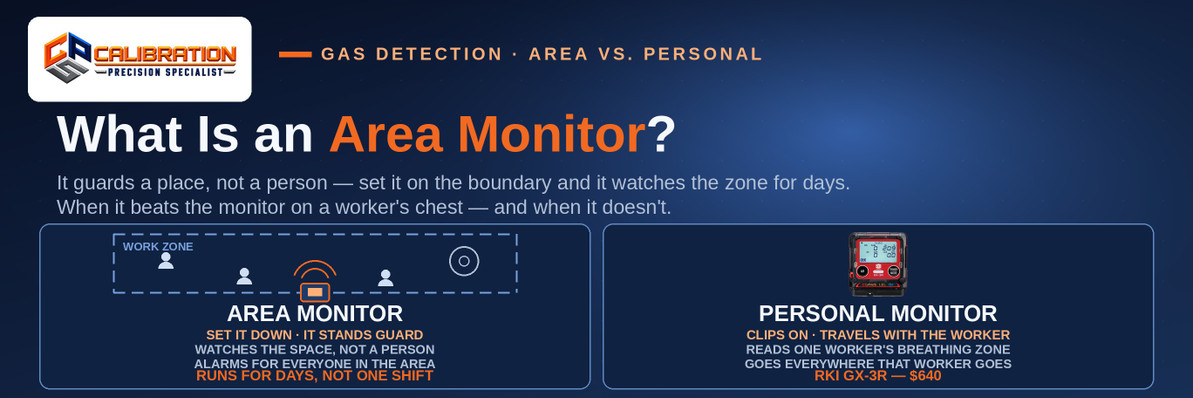
An area monitor is a transportable multi-gas gas detector that guards a place instead of a person: you set it at the boundary of a work zone — outside a tank entry, around a hot-work job, across a turnaround — and it samples that space continuously, with alarms built to be heard across the whole area and, on wireless models, readings shared with every other linked unit. It beats a personal monitor whenever the space needs the guard — before anyone enters it, while nobody is in it, and wherever gas would build up before it ever reached a worker's chest — and it loses the moment the worker walks out of the zone, because an area monitor stays with the space while a personal monitor stays with the breathing zone.
Every other detector in this series guards somebody. A personal monitor clips to a worker's chest and reads the air that worker is about to breathe; a fixed detector watches one point on a wall, forever. An area monitor is the third shape of the idea: bigger than a personal monitor, smaller than a fixed system, built to be carried in, set down at the edge of a job, and left watching a space for days at a time. It is the instrument behind the fence line at a turnaround, the box sitting outside a tank opening while a crew works inside, and the perimeter that warns a hot-work crew before the atmosphere turns. This post defines the class, puts it head to head with the personal monitor it is most often compared to, and works through when each one wins. Two neighbors worth reading alongside it: our walkthrough of how to test a confined space before entry, where an area monitor often stands guard, and our post on wireless gas detection, because wireless is what turns a row of area monitors into a network.
What Is an Area Monitor, Exactly?
An area monitor is a multi-gas detector designed around a zone rather than a wearer. The class traits follow from that one decision:
- Transportable, not worn and not plumbed. It is carried to the job and set at a boundary — a tripod, a railing, the ground at a tank portal — and picked up when the job moves. No conduit, no mounting plate, no electrician.
- A battery measured in days. A personal monitor is built around a shift; an area monitor is built around a deployment. Industrial Scientific's Radius BZ1, the benchmark unit in the class, runs a typical 7 days (168 hours) on a charge in diffusion mode with wireless on — and longer on external or solar power.
- An alarm built for distance. A personal alarm has to reach one pair of ears a foot away. An area alarm has to reach everybody in the zone, over plant noise: the BZ1 sounds at 108 dB at 1 meter, with alarm messages on a display sized to be read from across the work area.
- Multi-gas, often pumped. Area monitors typically carry the standard four gases (LEL, O₂, CO, H₂S) and often more — the BZ1 reads up to seven gases at once, PID included. Pumped versions draw a sample through a hose, which is how one unit outside a confined space can keep a continuous read on the air inside it.
- Made to be a network node. On wireless models, area monitors link into peer groups that share readings and alarms: one unit alarms, and every linked unit — including, on the BZ1's LENS Wireless system, workers' personal monitors — shows it. That sharing is what makes a perimeter a system instead of a row of separate boxes.
One honest store note, in the open: CPS does not list a dedicated area monitor today. The transportable wireless layer we carry is a step to the side of the class — battery-powered wireless detector heads like the OTIS OI-6900-XP WireFree head ($3,215) and the RKI AirLink 6900 ($4,246), which report to a controller by radio and get deployed where running wire doesn't pay. The true area-monitor class — the BZ1 and its peers — is defined above so you can spec the job correctly whichever way you buy it.
Area Monitor vs. Personal Monitor, Head to Head
| Area monitor | Personal monitor | |
|---|---|---|
| Guards | A zone: the space inside a boundary | A person: one worker's breathing zone |
| Samples | The air where it's placed; pumped models draw through a hose from inside the space | The air at the worker's chest — the next breath they take |
| Battery | Days per charge (Radius BZ1 class: 7 days typical) | A shift and change (RKI GX-3R: about 25 hours) |
| Alarm | Built for distance — 108 dB at 1 m on the BZ1, made to carry across an area | Built for the wearer — 100 dB on the GX-3R, at the chest |
| Who gets warned | Everyone in earshot — and every linked unit, on wireless models | The wearer. Nobody else, unless it's a wireless model in a shared group |
| Blind spot | Anywhere outside its zone — it never follows a worker | Everywhere the worker isn't — it sees nothing until its wearer walks into the gas |
| CPS examples | Not listed as a class today; battery-powered wireless heads (OTIS WireFree, RKI AirLink) cover temporary unwired points | RKI GX-3R — $640 · SENKO SP-MGT — $485 |
Read the blind-spot row twice, because it decides everything below. The two instruments don't compete so much as they cover each other's hole: the area monitor sees the hazard coming and can't follow anyone; the personal monitor follows its worker everywhere and can't see anything until the worker is already in it.
When Does an Area Monitor Beat Personal Monitors?
Before anyone goes in. The whole point of a perimeter is warning that arrives ahead of the worker. An area monitor at a tank portal or along a fence line reads the atmosphere continuously, so the first information about a bad space reaches people while they are still outside it. A personal monitor's first reading, by definition, happens after its wearer has entered the air you're worried about — the subject of our confined-space testing walkthrough. Pre-entry testing with a pumped personal monitor is still required practice; the area monitor is what keeps watching after that test is over.
While nobody is in the space. Leaks don't check the shift schedule. A valve starts passing at 2 a.m. in an unmanned area and a personal-monitor-only program learns about it when the first worker walks in the next morning — with his chest as the sensor. An area monitor standing guard in the space alarms when the leak starts, and on a wireless network that alarm lands on linked units and gateways where people actually are. Unoccupied process areas, tank farms between rounds, and lone-worker zones are area-monitor ground for exactly this reason.
Turnarounds and temporary work. A turnaround concentrates hundreds of workers, dozens of opened systems, and a schedule measured in days — in a plant whose fixed detection was never laid out for the work being done. Area monitors deploy in hours, move as the job moves, and come out when the unit goes back online. It is the class's home turf: temporary hazard, temporary guard, no installed infrastructure left behind.
Hot work. A fire watch needs to know the atmosphere around the weld is turning before the crew in the middle of it does. An area monitor at the perimeter of the hot-work zone watches continuously — including the breaks, when every personal monitor has walked off to lunch with its wearer — and its alarm is loud enough to clear the whole area at once. Our post on gas detection for hot work covers what the fire watch monitors and why.
As the attendant's eyes. In confined-space work the attendant stays outside the space and may not leave the post — and may not enter, either. A pumped area monitor at the portal, sampling the space through a hose, gives that attendant a continuous reading and an alarm that announces itself, instead of a personal monitor's display buried inside the space on the entrant's chest. It complements the entrant's own monitor; it never replaces it, for the reason in the next section.
When Does the Personal Monitor Win?
The worker is the thing that moves. Hazards in a plant are not all fenced zones. A maintenance tech's day crosses a dozen areas, none of them individually worth a perimeter, all of them worth a monitor on his chest. The personal monitor is the only instrument whose coverage follows the exposure — into the pipe rack, up the structure, down into the pit. An area monitor guards the zone it was left in, perfectly, while its owner works somewhere else entirely.
The breathing zone is the measurement that counts. Exposure happens at the nose and mouth, and gas concentrations are not uniform: pockets, layers, and plumes mean the air at a boundary monitor and the air at a worker's face two rooms away can be entirely different atmospheres. Where gas goes when it leaks is the physics behind that. A personal monitor reads the one sample that actually decides the worker's dose.
The entrant, specifically. Inside a confined space, the entrant's own monitor is not optional equipment that an outside unit can substitute for: the reading has to travel with the person, into the far end of the vessel, at the level where they're working. The area monitor at the portal watches the portal. Both layers exist because the space and the worker are different problems — the same prevention-versus-coverage logic as layering fixed and portable detection in our guide to how a fixed gas detection system works.
The arithmetic of crews. Guarding a zone takes one area monitor; guarding thirty scattered workers takes thirty personal monitors — but they cost accordingly less each, they are already how most plants equip people, and they double as the compliance record for personal exposure monitoring. Browse the class in our portable multi-gas monitors and single-gas monitors categories: a GX-3R at $640 or an SP-MGT at $485 per worker is a different budget conversation than a multi-thousand-dollar unit per zone.
The Wireless Layer Changes the Math
Standalone, an area monitor is a loud local alarm. Networked, it becomes the plant's early-warning system — and this is where the class has moved fastest. Peer-to-peer wireless groups let units share readings and alarms with no infrastructure: set four units around a job and a hit on the far side alarms on all four, plus on linked personal monitors and a gateway feeding a control room or a safety attendant's screen. The perimeter stops being four separate guesses and becomes one picture of the whole zone, live.
That same radio logic is what our wireless gas detection post works through for detector heads: battery-powered units like the OTIS WireFree and RKI AirLink lines reporting to a controller without conduit. The use case overlaps the area monitor's — temporary points, unwired areas, jobs that move — with a different endpoint: readings land on a central controller rather than on peer units around a zone. Which shape fits depends on who needs the alarm: the crew inside the boundary, the attendant outside it, or the control room across the plant. Often the honest answer is more than one of them.
Frequently Asked Questions
What is an area monitor in gas detection? An area monitor is a transportable multi-gas detector that guards a zone instead of a person. You place it at the boundary of a work area — a tank entry, a hot-work perimeter, a turnaround — and it samples that space continuously, with a battery that runs for days (about 7 days typical on Industrial Scientific's Radius BZ1) and an alarm built to be heard across the whole area (108 dB at 1 meter on the BZ1). Wireless models share readings and alarms with other linked units.
What is the difference between an area monitor and a personal gas monitor? What they guard. A personal monitor clips to a worker and reads the air in that worker's breathing zone, going everywhere the worker goes — the RKI GX-3R ($640) runs about 25 hours per charge with a 100 dB alarm meant for the wearer. An area monitor stays with the space: days of battery, a louder alarm for the whole zone, and readings for a place whether or not anyone is standing in it. Each is blind where the other sees: the area monitor can't follow a worker, and the personal monitor can't warn anyone before its wearer walks into the gas.
Can an area monitor replace personal gas monitors? No. An area monitor only reads the air inside its zone; the moment a worker leaves that zone — or works at the far end of a vessel from the sampling point — the reading no longer describes the air they're breathing. Entrants and mobile workers still need their own monitors. What an area monitor replaces is the gap personal monitors can't cover: unoccupied spaces, pre-entry warning, and perimeters. Most well-run jobs use both, layered.
When should you use an area monitor? When the space needs a guard of its own: around tank and vessel entries, along hot-work perimeters, across turnarounds and other temporary work, in unmanned process areas and tank farms between rounds, and at a confined-space portal where the attendant needs a continuous read on the air inside. The common thread is a hazard tied to a place — especially one that could develop while nobody is wearing a monitor in it.
How long does an area monitor's battery last? Days, not shifts — that runtime is the point of the class. The Radius BZ1 runs a typical 7 days (168 hours) on a charge in diffusion mode with wireless operating, about 3.5 days with its pump running, and longer still on external or solar power supplies. A personal monitor like the GX-3R runs about 25 hours. The trade: the area monitor's battery is a deployment clock you plan around, not a daily recharge habit.
How loud is an area monitor's alarm? Louder than a personal monitor's, and built for distance. The Radius BZ1 sounds at 108 dB at 1 meter — meant to cut through plant noise and reach everyone in the zone, with a large display that can show action messages. A personal monitor's alarm (100 dB on the GX-3R) only has to reach the wearer. On wireless area-monitor networks, the alarm also appears on every linked unit, so being out of earshot of the alarming unit doesn't mean missing the alarm.
Do area monitors share alarms with personal monitors? On wireless systems, yes. Peer-to-peer networks like LENS Wireless (on the Radius BZ1) let area monitors share readings and alarms with each other and with compatible personal monitors in the same group — an alarm at one end of a perimeter shows up on units and wearers across the job. That sharing is what turns a row of separate monitors into one connected picture of the whole work area.
Can an area monitor test a confined space before entry? It can keep watch, and pumped models can sample the space from outside through a hose — a common arrangement at a portal, giving the attendant a continuous reading during entry. It does not replace the pre-entry test itself, which is done with a pumped monitor drawn through the space in OSHA's sequence — oxygen first, then combustibles, then toxics — before anyone goes in. Our confined-space testing walkthrough covers that sequence step by step.
How many gases can an area monitor detect? Typically the standard four — combustible gas (%LEL), oxygen, carbon monoxide, and hydrogen sulfide — and the class runs wider than personal monitors: the Radius BZ1 reads up to seven gases simultaneously, with PID for VOCs among its sensor options. More channels make sense on an instrument guarding a whole zone, where the hazard list is whatever the space can produce, not just what one worker's task involves.
How much does an area monitor cost? Purpose-built area monitors are multi-thousand-dollar instruments — a different budget line from personal monitors at $485 (SENKO SP-MGT) to $640 (RKI GX-3R) per worker. CPS does not list a dedicated area monitor today; the closest layer we carry is battery-powered wireless detector heads — the OTIS OI-6900-XP WireFree head at $3,215 and the RKI AirLink 6900 at $4,246 — which cover temporary, unwired points reporting to a controller. If your job specs a true area monitor, call us and we'll spec it against the zone you're guarding.
The Bottom Line
An area monitor guards a place; a personal monitor guards a person — and the incidents that hurt people tend to live in the seam between those two sentences. The leak that starts in an empty space, the atmosphere that turns while the crew is at lunch, the entrant whose attendant can't see his readings: those are area-monitor problems. The worker crossing a dozen unmonitored areas, the pocket of gas at face height in the far end of a vessel: those are personal-monitor problems. Spec the zone first — entries, perimeters, temporary work, unmanned spaces — then put a personal monitor on every worker anyway, and let wireless tie the two layers into one picture where the job justifies it. Neither instrument is the upgrade from the other. They are the two halves of coverage.
Guarding a zone, a crew, or both — and not sure which layer your job needs? Call 865-900-8844 or reach us through Contact Us. Personal monitors are in our portable multi-gas and single-gas categories, the wireless heads are covered in our wireless gas detection post, and the service side — bump testing, calibration, and repair for everything above — lives at Calibration Services.
CPS Calibrations · 109 S. Front Street, Rockwood, TN 37854 · Calibration Gas · Calibration Services · Contact Us
Need a calibration you can file?
In-house calibration at CPS in Rockwood, Tennessee — $55 for single-gas instruments, $90 for 4- and 5-gas — every channel, as-found and as-left data, full certificate.
See Calibration Servicesor call 865-900-8844
Recent Posts
-

Can You Add a Pump to a SENKO SGT-P or MGT?
Yes — SENKO's SP-Pump101 external sampling pump ($330, part AAA006000) fits the SGT, SGT-P, and MGT, …Nov 12th 2026 -

What Refrigerant Detection Does a Grocery Store Need?
A grocery store needs refrigerant detection in three places: low-mounted carbon dioxide (R-744) sens …Nov 11th 2026 -

What Is LEL and UEL? The Explosive Range, Gas by Gas
The LEL is the lowest concentration of a gas in air that can explode, and the UEL is the highest: me …Nov 10th 2026