
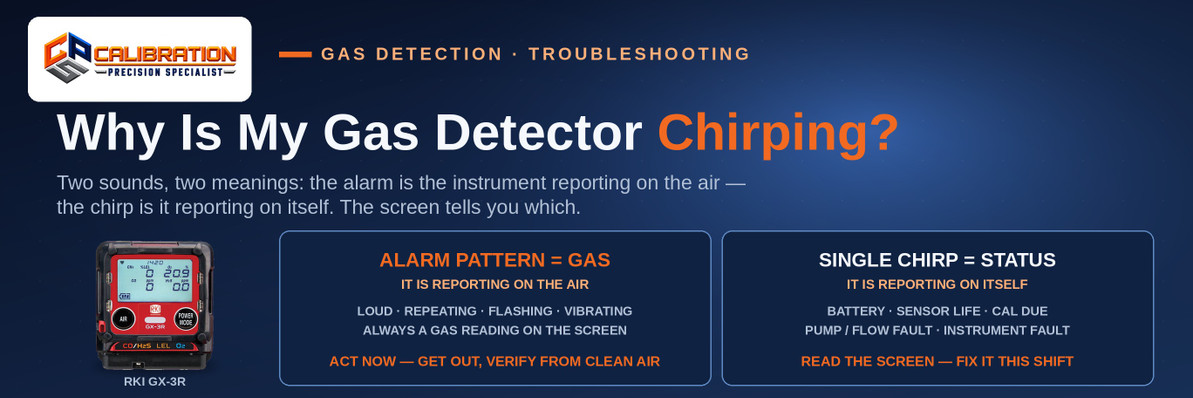
Why Is My Gas Detector Chirping?
A gas detector makes two completely different sounds, and they mean opposite things. A gas alarm is loud, repeating, and insistent — flashing lights, vibration, and a gas reading on the display — and it means treat the air as dangerous until you have proven otherwise from somewhere safe. A chirp is a single short beep that repeats on a slow, regular cycle, with no gas reading behind it: that is the instrument filing a status report about itself — a low battery, a sensor at end of life or failed, a bump test or calibration that has come due, a pump or flow fault, or an instrument fault. The display always names which one it is. Read the screen first, and the sound explains itself.
Few sounds cause as much confusion per decibel as a chirping gas detector. It gets treated both ways it shouldn't be: crews evacuate a building over a low-battery chirp, and — far worse — crews learn to wave off a genuine alarm because "it chirps all the time." Both mistakes come from reacting to the sound instead of reading it. A modern portable monitor distinguishes clearly between "the air is bad" and "I need attention" — it just communicates the second message in beeps, and expects you to look at the screen for the details. This post decodes the sounds: which one is an emergency, the five causes behind nearly every status chirp, the one beep that is supposed to happen, and what to do, in order, when your monitor starts talking.
First, the Sound That Is Not a Chirp: The Gas Alarm
A gas alarm is not a beep — it is an event. When the reading crosses an alarm setpoint, the instrument sounds a loud, repeating alarm pattern, flashes its lights, vibrates, and shows you the reason on the display: the gas, and how much of it there is, in ppm or %LEL. The time-weighted alarms behave the same way — a TWA or STEL alarm is also a real alarm, with a real exposure number behind it, even if the gas has since cleared. The defining feature of every true alarm is that there is a reading attached. Sound plus numbers means the instrument believes the atmosphere is, or recently was, over a limit.
That sound has exactly one correct response, and it is not troubleshooting. Leave the area, follow your site procedure, and verify the atmosphere from clean air — ideally with a second instrument — before anyone goes back in. Never silence an alarm and stay to figure it out, and never decide an alarm must be false because the monitor "cries wolf." An instrument that alarms falsely has a fault that needs fixing, but it gets fixed after the area is proven safe, from outside it. Everything else in this post is about the other sound — the one with no reading behind it.
So What Is a Single Repeating Chirp?
A chirp is one short beep, repeated at a regular interval, while the instrument otherwise sits quiet — no alarm pattern, no flashing gas reading, nothing on the display but some small icon or message you may have to look twice to notice. Think of the two sounds as two different speakers. The alarm is the sensor talking about the air. The chirp is the instrument talking about itself: its battery, its sensors, its test schedule, its pump, its own health. It is the monitor's way of tapping you on the shoulder instead of shouting.
The single most useful habit with any chirping instrument is also the simplest: look at the screen before you do anything else. Every standard cause of a status chirp announces itself there — a battery icon, a sensor message, a due-date notice, a flow or fault indicator. The beep gets your attention; the display gives the diagnosis. Skip that step and you end up guessing — and guessing is how a monitor with a dead sensor gets charged overnight and handed back out in the morning, still chirping, still ignored.
The Five Causes Behind Almost Every Chirp
Across brands and models, the same five causes produce nearly every status chirp you will ever hear. The exact icons and wording vary by instrument, but the list itself is remarkably stable:
| Cause | What the screen shows | What to do |
|---|---|---|
| Low battery | A battery icon — flashing, empty, or flagged in the startup self-test | Charge it or swap the pack now. Do not start a shift on a battery the instrument is already warning you about |
| Sensor end of life, missing, or failed | A sensor error or sensor alarm message, often naming the channel position | That channel is not protecting anyone. Replace the sensor or send the instrument in — see when a sensor is due for replacement |
| Bump test or calibration overdue | A due notice, a test/calibration date prompt, or a reminder flagged at startup or on the dock | Bump test it; if it fails or the calibration is due, run a full calibration before it goes back out |
| Pump or flow fault (pumped models) | A flow, pump, or low-flow warning | Check the intake, filter, and sample line for a blockage or kink, clear it, and confirm normal flow before trusting any reading |
| Instrument fault | A fault or error indicator, sometimes with a code or message | Write down exactly what the display says, take the instrument out of service, and get it looked at |
Low battery is the most common chirp in the building and the easiest to read: the instrument warns you while it still has reserve, precisely so it does not die silently mid-shift. Respect the design — a monitor that chirps for its battery at 7 a.m. is telling you it may not be awake at 3 p.m., and a dead monitor reads zero in every gas there is. Sensor problems are the chirp with real teeth. Sensors are consumables with finite lives, and when one reaches end of life, fails its self-check, or is missing entirely, the instrument flags that channel — and a flagged channel is a hole in your protection shaped exactly like the gas you bought it to find. Charging will not fix it and neither will waiting.
Due-date chirps are the fleet-management sound. Many instruments track their bump test and calibration intervals and prompt when one comes due; fleets that run docking stations get the same message reinforced by the dock. Treat the prompt as the program working, not nagging: bump it, calibrate it if it's due, and if it fails the bump test, our post on why bump tests fail walks the reasons. Pump and flow faults belong to pumped, sample-drawing models: the pump watches its own flow, and a blocked filter, a kinked line, or water in the intake drops that flow and earns a warning — a warning that matters, because a starved pump means the reading on the screen is not the air at the end of the hose. And a general instrument fault is the catch-all: the instrument ran its self-checks and something — electronics, memory, a sensor circuit — didn't pass. That one is not field-fixable by menu-diving; note the message verbatim and send it in.
The One Beep That Is Supposed to Happen: The Confidence Beep
There is one periodic beep that means nothing is wrong at all. Many portables offer a confidence — sometimes called comfort — beep or flash: a brief periodic signal whose entire job is to prove, at a glance across a noisy room, that the instrument is on, running, and sampling. It is a feature, usually configurable, and fleets use it because "is that monitor actually on?" is a question worth answering continuously. You tell it apart from a status chirp the same way you tell everything else apart: the screen. A confidence signal comes with a clean display — no battery flag, no sensor message, no due notice, no fault. If the beep has an icon or a message keeping it company, it is not the confidence beep, whatever it sounds like.
What to Do When Your Detector Chirps, In Order
- Look at the screen. Is there a gas reading in alarm, or an alarm banner? If yes, stop here — that is the alarm procedure, not a chirp: leave, and verify from clean air.
- If there is no reading, find the icon or message. Battery, sensor, due date, pump/flow, or fault — the display has already done the diagnosis. Match it to the table above.
- Fix that thing, this shift. Charge or swap the battery. Dock it and clear the overdue bump or calibration. Clear the flow path and confirm the pump recovers. A chirp answered the same shift is a maintenance note; a chirp carried for a week is a habit forming.
- If the cause is a sensor or a fault, pull the instrument from service. Tag it so the next person does not grab it off the charger, and get the sensor replaced or the instrument sent in. A monitor with a dead channel or an unresolved fault does not go in a pocket "just for the other gases."
- If it still chirps after the fix — or the message matches nothing here — stop and call. An instrument you cannot interpret is not an instrument you can trust, and that is a service conversation, not a field experiment.
Why Chirps Get Ignored — and Why That Is the Real Hazard
The chirp itself rarely hurts anyone. What hurts people is the training a chirp gives a crew. An instrument that beeps for days over an overdue calibration teaches everyone within earshot that this device makes noise that doesn't matter — and that lesson does not stay in its lane. It transfers, silently, to the day the same model makes the other sound. Alarm fatigue is not a character flaw; it is the predictable result of audible warnings that never get resolved, and the cure is not sterner posters, it's a shorter loop between the beep and the fix. The other habitat of the ignored chirp is the charging shelf: monitors wake up, run their self-tests, notice their due dates and dying batteries, and announce all of it to an empty room. Somebody eventually unplugs the "noisy one" — and now the fleet's most honest instrument is the one out of rotation, waiting to be grabbed in a hurry by someone who never heard it say why. Tagging a chirping instrument out of service takes thirty seconds and breaks both chains.
Related Sounds, Related Numbers
A chirp is the instrument reporting on itself; two close cousins are worth knowing because they show up in the same troubleshooting conversations. A monitor that reads below zero in clean air has a zero-drift problem, covered in our post on why gas detectors read negative — and an instrument that fails its bump test is telling you something more serious than a due date, which is why failed bump tests get their own investigation rather than a second try and a shrug. And when the sound really is the alarm, knowing what the numbers mean — starting with what LEL means — is what turns a loud noise into a decision.
Frequently Asked Questions
Why is my gas detector chirping but not alarming? Because the chirp and the alarm are two different messages. An alarm is a loud, repeating pattern with a gas reading on the display — that is the instrument reporting on the air. A chirp is a single repeating beep with no reading behind it — the instrument reporting on itself. The usual causes are a low battery, a sensor at end of life or failed, a bump test or calibration that has come due, a pump or flow fault on a pumped model, or an instrument fault. Read the icon or message on the display; it names the cause.
How do I tell a gas alarm from a status chirp? Look for a reading. A gas alarm always comes with one: the display shows the gas and its concentration in alarm, alongside the loud repeating sound, flashing lights, and vibration. A status chirp has no reading — just the beep and a small icon or message (battery, sensor, due date, flow, fault). When in doubt, treat it as an alarm: leave the area and check the display from clean air. The cost of being wrong in that direction is a short walk; the other direction is the accident report.
Is a chirping gas detector dangerous? The chirp itself is a warning, not a hazard — but what it is warning about can be. A low-battery chirp means the instrument may die mid-shift and read nothing at all. A sensor chirp means one channel is no longer protecting you. A due-date chirp means the instrument's accuracy is unverified. None of those is an emergency this second, and all of them become dangerous if the instrument keeps going out the door unfixed. Fix the cause the same shift — never just silence it.
Can a low battery make a gas detector chirp? Yes — it is the most common cause. Portable monitors warn about a low battery with a status beep and a battery icon on the display while they still have reserve power, so the instrument does not go dead without telling anyone. Charge it or swap the pack before the instrument goes back out. Starting a shift on a battery the instrument is already flagging is how a crew ends up wearing a monitor that quietly switched off hours ago.
Why does my gas detector chirp when I turn it on? Turning on starts a self-test, and the self-test reports everything it finds. A few beeps during startup that stop on their own are the sequence running normally. Beeps that continue after the instrument settles — with a battery icon, a sensor message, a due notice, or a fault on the screen — are the self-test telling you what it found: charge it, clear the overdue test, or deal with the sensor or fault before the instrument goes to work. What the startup chirp is never doing is commenting on the air; there is no reading behind it.
Will a gas detector chirp when calibration or a bump test is due? On many instruments, yes. Monitors that track their test intervals prompt when a bump test or calibration comes due — with a due notice on the display and, on many models, a status beep to get your attention — and docking stations reinforce the same reminder in fleets that use them. It is the maintenance program working as designed. Bump test the instrument; if the calibration itself is due, calibrate it. Resetting the reminder without doing the test leaves you with a quiet instrument and an unverified one.
My gas detector is chirping and shows a sensor error. What do I do? Take it out of service. A sensor error means that channel — the one named on the display — has failed, reached end of life, or is not being seen by the instrument at all, and it is not measuring its gas. Charging and calibrating do not fix a dead sensor. The sensor gets replaced or the instrument goes in for service, and the unit gets tagged so nobody else picks it up in the meantime. Do not carry it "for the other three gases" — partial monitors create full-size confidence.
Why is my gas detector chirping in the charger or the storage case? Usually because it is awake and doing its job in an empty room. A monitor left on, or one that wakes to run its checks, will announce whatever it finds — a battery draining toward low, a bump or calibration date arriving, a sensor aging out — whether or not anyone is there to hear it. Retrieve it, read the screen, fix the cause, and store instruments in the state your program specifies — the chirp was a message addressed to whoever found it.
What does a chirp on a pumped gas detector mean? On a sample-draw (pumped) model, one more cause joins the list: flow. The pump monitors its own draw, and a blocked intake filter, a kinked or flooded sample line, or a failing pump drops the flow and triggers a flow or pump warning — typically with a status beep and the warning on the display. Clear the intake and line, confirm the flow recovers, and re-check before trusting readings: a starved pump means the number on the screen may not be the air at the far end of the hose.
Should I just turn off a chirping gas detector and grab another one? Grabbing a working instrument is right; abandoning the chirping one is not. Powering it down silences the message without answering it, and the next person to pick it up inherits the dead battery, the failed sensor, or the overdue calibration without the beep that explained it. Tag it out of service with the cause if you know it — thirty seconds with a tag and a marker — and hand it to whoever runs your instrument program. The chirp was the instrument asking for maintenance; make sure the request survives the hand-off.
The Bottom Line
A gas detector's sounds are a small language with a strict grammar: a loud, repeating alarm with a reading on the screen is the instrument talking about the air, and it is answered by leaving and verifying from safety. A single repeating chirp with no reading is the instrument talking about itself — battery, sensor, due date, pump, or fault — and it is answered by reading the display and fixing that thing the same shift. Every dangerous version of this story is a mix-up between the two: an alarm dismissed as "just the chirp," or a sensor failure muted for a week. Read the screen first. The beep is only ever the headline — the instrument prints the whole story right underneath it.
Monitor chirping and the screen isn't making sense? That is what we're here for — call 865-900-8844 or reach us through Contact Us. CPS services the instruments it sells and most it doesn't, and a sensor swap or calibration beats a guess. Browse the lines in the portable multi-gas and single-gas monitor categories, or see our Calibration Services page for how ship-in service works.
CPS Calibrations · 109 S. Front Street, Rockwood, TN 37854 · Calibration Gas · Calibration Services · Contact Us
Need a calibration you can file?
In-house calibration at CPS in Rockwood, Tennessee — $55 for single-gas instruments, $90 for 4- and 5-gas — every channel, as-found and as-left data, full certificate.
See Calibration Servicesor call 865-900-8844
Recent Posts
-

What Is Remote Monitoring for Fixed Gas Detection?
Remote monitoring for fixed gas detection means a fixed system's live readings, trends, and alarm hi …Nov 23rd 2026 -

What Are the Key Differences Between the GX-6000 and GX-6100?
The RKI GX-6100 is the current replacement for the discontinued GX-6000: both are pumped 6-gas monit …Nov 22nd 2026 -

How to Read a PID Correction Factor Chart
To read a PID correction factor chart, find your vapor’s row, take the factor under your own lamp en …Nov 21st 2026